GMKtec EVO-X2 review: 128 GB, and 96 GB of it for the GPU
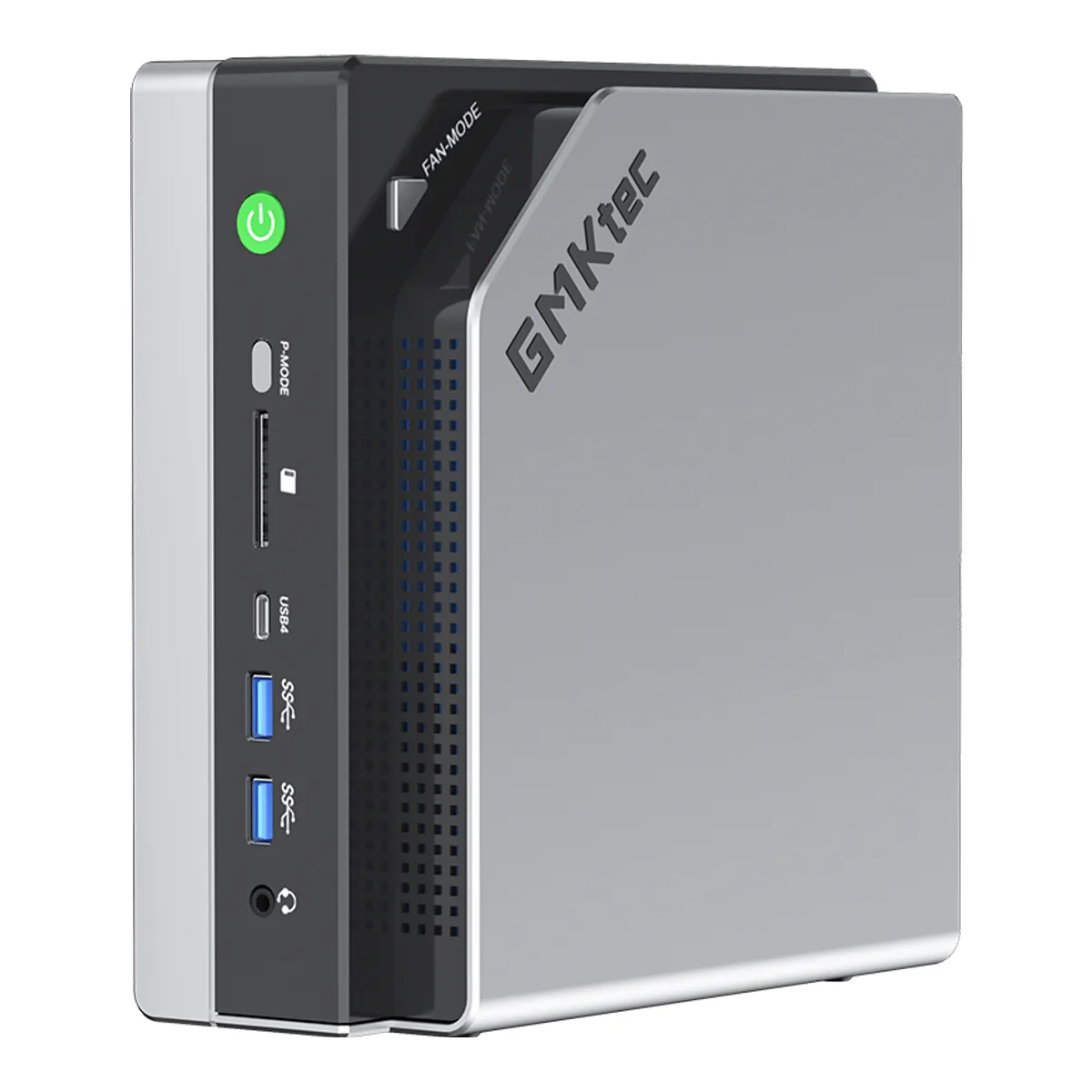
The GMKtec EVO-X2 runs models that will not fit on a consumer graphics card, because 96 GB of its 128 GB is addressable by the GPU, and the cost of that is a fan that Tom's Hardware, a collated review and an owner all remarked on.
- AMD Ryzen AI Max+ 395, 16 cores and 32 threads, Zen 5, up to 5.1 GHz, 64 MB L3 cache
- TDP runs steadily at 120 W with a peak of 140 W
- AMD Radeon 8060S graphics, 40 RDNA 3.5 compute units
- XDNA 2 NPU rated 50 TOPS, total processor performance up to 126 TOPS
- Onboard LPDDR5X at 8000 MHz, eight channel, non-upgradeable, in 64 GB or 128 GB
- Dual M.2 2280 slots, each up to 8 TB over PCIe Gen4 x4, 16 TB total
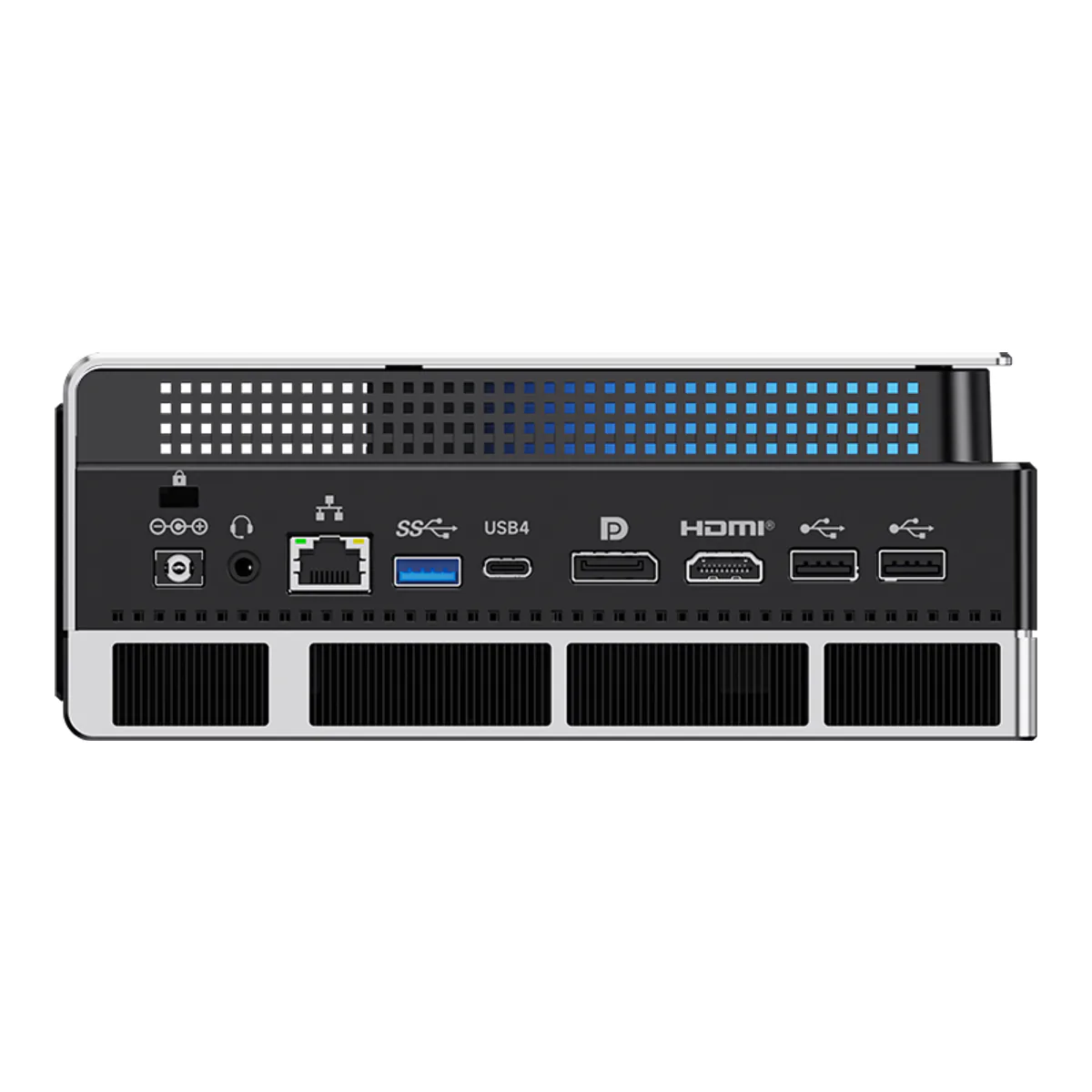
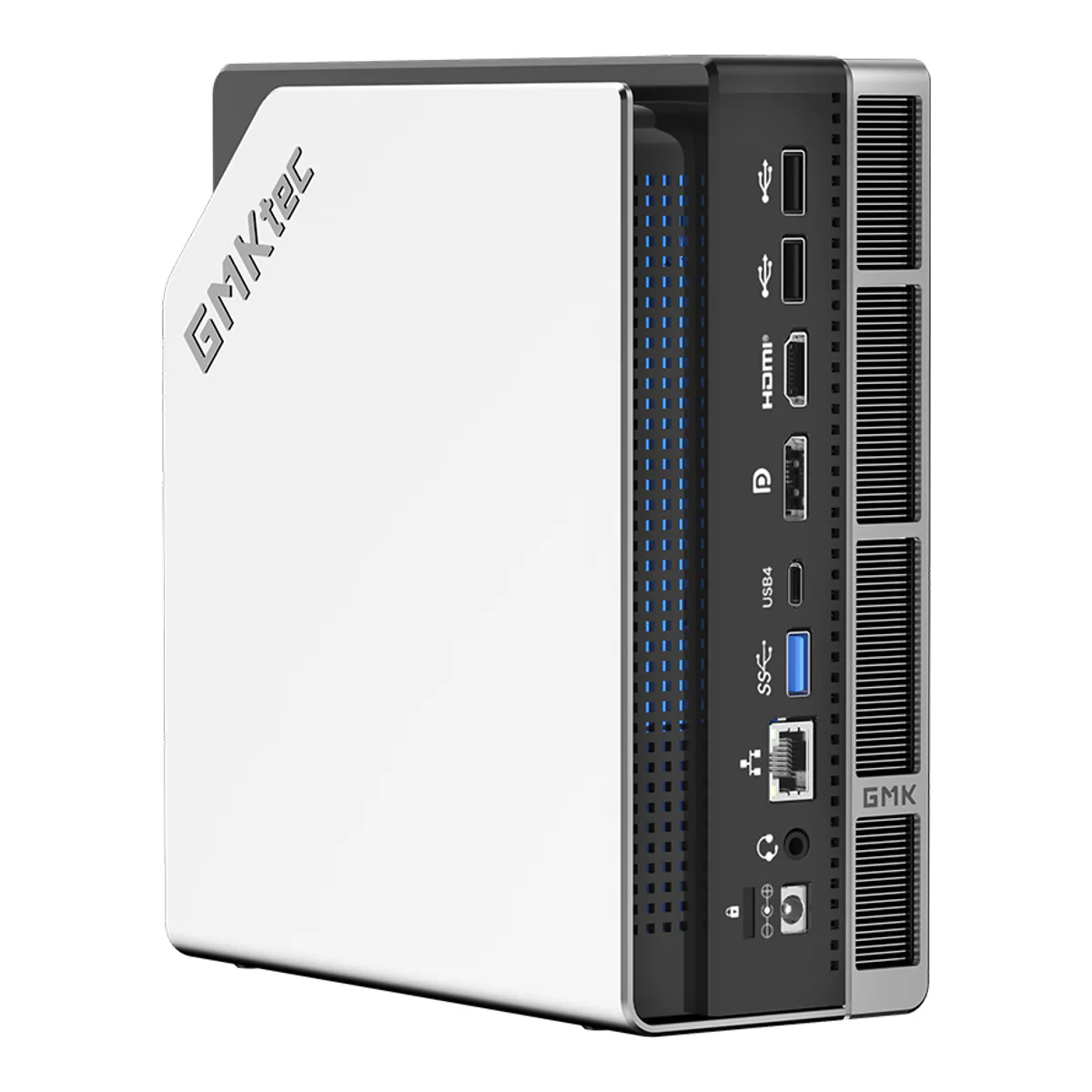
- One RJ45 at 2.5 Gbps using the 8125BG controller, Wi-Fi 7 and Bluetooth 5.4
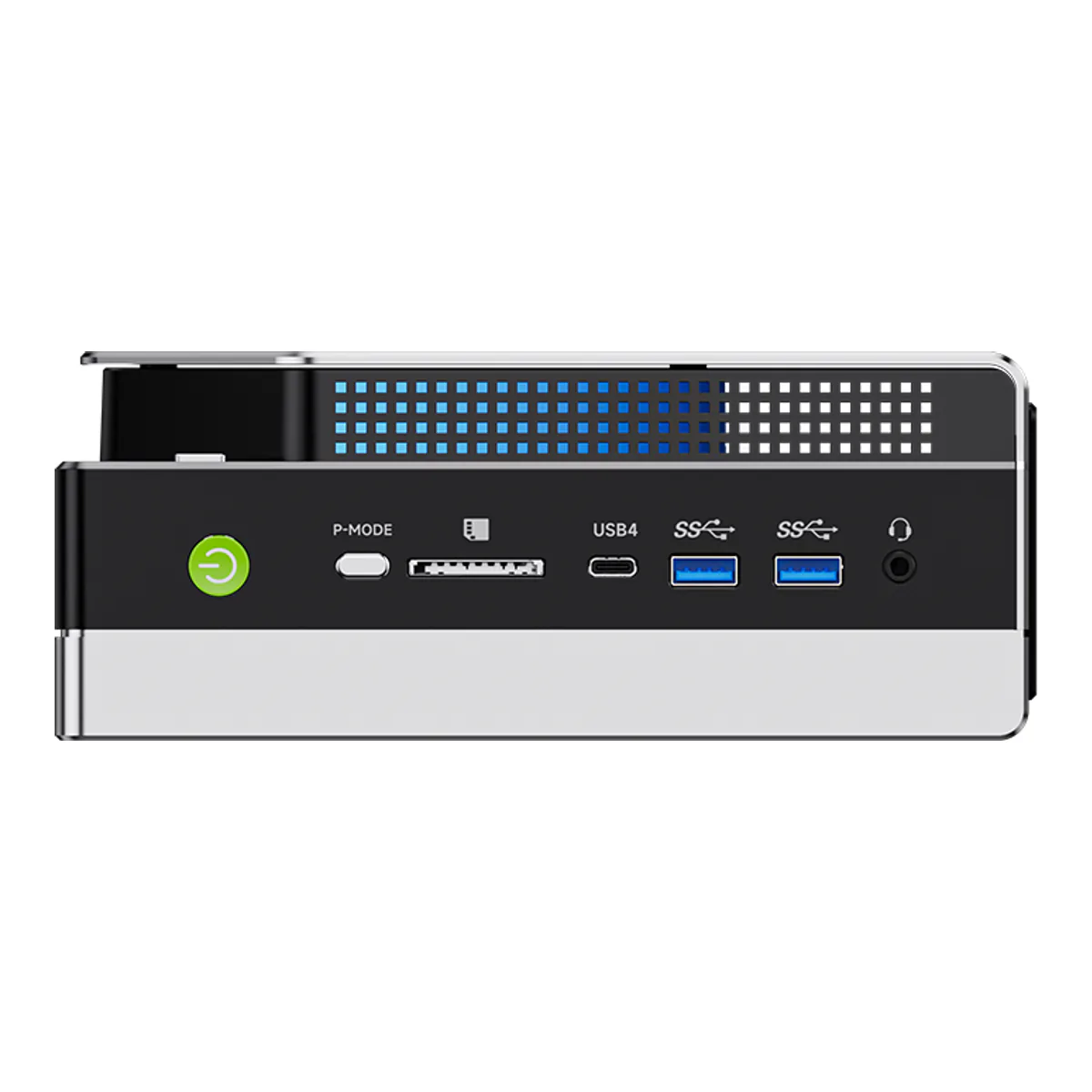
- HDMI 2.1, DisplayPort 1.4 and two USB4 ports
- Dimensions 193 mm x 185.8 mm x 77 mm
We earn a commission on qualifying purchases through the links here, at no cost to you. It never decides what makes the list.
Buy this one for the memory or do not buy it at all. Every other thing the GMKtec EVO-X2 does well, another mini PC on this shelf does nearly as well and in less space, and several of them let you change the memory afterwards.
What none of them do is hand 96 GB to an integrated GPU.
Running a large model locally is the whole point
The Ryzen AI Max+ 395 pairs 16 Zen 5 cores with a Radeon 8060S built from 40 RDNA 3.5 compute units, and GMKtec puts 128 GB of LPDDR5X at 8000 MHz on eight channels behind both of them. Tom's Hardware, reviewing the machine, spells out the consequence: the 128 GB configuration "delivers a massive 96GB of GPU‑addressable memory".
The 96 GB figure matters most, and the listing prints a different number. A consumer graphics card tops out well below it, so a quantized model in the tens of billions of parameters loads here and does not load there. For local LLM work that single fact outranks every benchmark further down. GMKtec's own page names DeepSeek-R1 70B and Llama 4 109B against the 128 GB build.
GMKtec quotes 50 TOPS for the NPU alone and 126 TOPS for the whole processor. Treat both as marketing arithmetic. You will not observe that throughput.
What the graphics actually deliver
Tom's Hardware measured it. In Star Wars Jedi: Fallen Order at 1920 x 1080 on Epic settings they saw "90-110 frames per second in most instances", with dips to around 70 in complex scenes and spikes past 120 in cutscenes.
Against the Framework Desktop, which runs the same processor, the two traded places: the EVO-X2 ahead in Shadow of the Tomb Raider at 91 against 87 FPS, in Cyberpunk 2077 at 28 against 22, and in Red Dead Redemption 2 at 62 against 57, but behind in Borderlands 3 at 78 against 103, which Tom's Hardware flags as possibly an anomaly.
Read those Cyberpunk numbers as what they are. Tom's Hardware notes the tests run at demanding settings and that dropping a notch or two yields much higher frame rates, and concludes any modern game should be playable at 1080p.
How loud does it get, and why the answers differ
Three sources, three readings, and the disagreement is the useful part.
Tom's Hardware found the fans "louder than expected", audible across the reviewer's living room during CPU benchmarks, though "during gaming, the fans were much more controlled since the CPU was not being fully stressed". They list fan noise as a con.
minipc-review.com reports by mode. That site is no lab. It aggregates other outlets and marketplace reviews alongside its own notes, so read it as a collation. In Quiet mode it gives 75 to 81 C and around 35 dB, which it calls perfectly acceptable. In Performance mode it gives temperatures frequently above 85 C with peaks to 98 C, and says that can cause thermal throttling and occasional freezing.
It recommends Balanced, and the number it publishes for Balanced is worth having before you take that advice: 87 to 94 C, "with peaks up to 98°C", the same peak it gives for Performance. The site attributes that band to Reddit users, not to its own measurement.
Tom's Hardware, meanwhile, ran the Metro Exodus benchmark 15 times in sequence and saw the processor average 61 C with under 1 FPS of variation between runs, which they read as stable thermal performance.
None of those readings is wrong. The machine has a physical P-mode button that cycles three profiles, and Tom's Hardware notes the default appears to be the high performance one with the other two trading speed for quieter fans. A sustained all-core CPU load in the default mode is a different machine from a gaming load in Balanced. An owner review on GMKtec's own product page reaches the harshest verdict of the three, listing "poor thermal design, and excessive fan noise" among the things that "marred the out-of-box experience".
If this box sits on your desk and not in another room, change the mode before you judge it. Where it sits may not be up to you either, and the two sources disagree. Tom's Hardware reports that the ventilation perforations along one side force it to stand upright, and that "There's also no VESA mounting support, so it must live on your desk", while minipc-review.com says it includes a VESA mount in the box for 75x75 and 100x100 mm patterns. Check the box contents against your plan before you count on hiding it.
The memory is soldered, and that is the decision
There are no SODIMM slots here. Soldered memory is the trade the eight channel LPDDR5X design demands, GMKtec states outright that it is not upgradeable, and so the capacity becomes a choice you make once at checkout and live with for as long as you own the machine. Soldering is unusual on this shelf. Four of the five machines on our hub take standard laptop modules.
Check which capacity a listing is actually selling. GMKtec's specification table offers 64 GB or 128 GB, while the model compatibility table further down the same page also lists a 96 GB build against a different set of models.
Order the 64 GB build to save money and the penalty is worse than halving. Tom's Hardware puts the two side by side: "the 64GB model can allocate up to 32GB for graphics, while the 128GB configuration can expose a massive 96GB to the GPU". A third, short of half. GMKtec's own model compatibility table marks both DeepSeek-R1 70B and the pre-installed Llama 4 109B as supported on the 128 GB build and not on the 64 GB one. The models named above as the reason to buy the machine do not run on the cheaper build at all.
Everything else here can be changed later: the two M.2 2280 slots each take up to 8 TB over PCIe Gen4 x4, the operating system is yours, the P-mode is a button. Memory is the exception, the one specification the rest of the mini PC shortlist lets you revisit.
Who should skip the GMKtec EVO-X2
Anyone whose bottleneck is the network. There is one RJ45 and it runs at 2.5 Gbps, which is an odd pairing with 128 GB of memory and 16 TB of possible storage. If the plan involves moving datasets to and from a NAS, the MINISFORUM MS-01 and its two 10 gigabit SFP+ cages is the machine that was designed for it.
Skip it too if you want CUDA. Tom's Hardware qualifies its own recommendation on being "willing to use AMD's software", and that caveat is fair. What that costs in practice comes from a buyer review that minipc-review.com reproduces from AliExpress, where the owner reports that "setting up ROCm isn't easy" and describes having to "find ROCm-compatible libraries, match the Python version, and adjust dependencies".
And skip it if quiet matters more than capability, because on that question every source we read landed somewhere between noticeable and excessive.
What we would check next
Two things would change our verdict. The first is AMD's software cadence, since almost every reservation above resolves to ROCm maturity, not to the hardware. The second is firmware: a commenter on the Tom's Hardware review complains of five months without a new release, and on a machine this new the update rhythm over the next year matters more than any benchmark on it today.
Neither is measurable from a spec sheet, so they sit here at the end and stay out of the table.
A closer look at the GMKtec EVO-X2
Made up your mind?