MINISFORUM MS-01 review: which GPUs fit, dual 10GbE
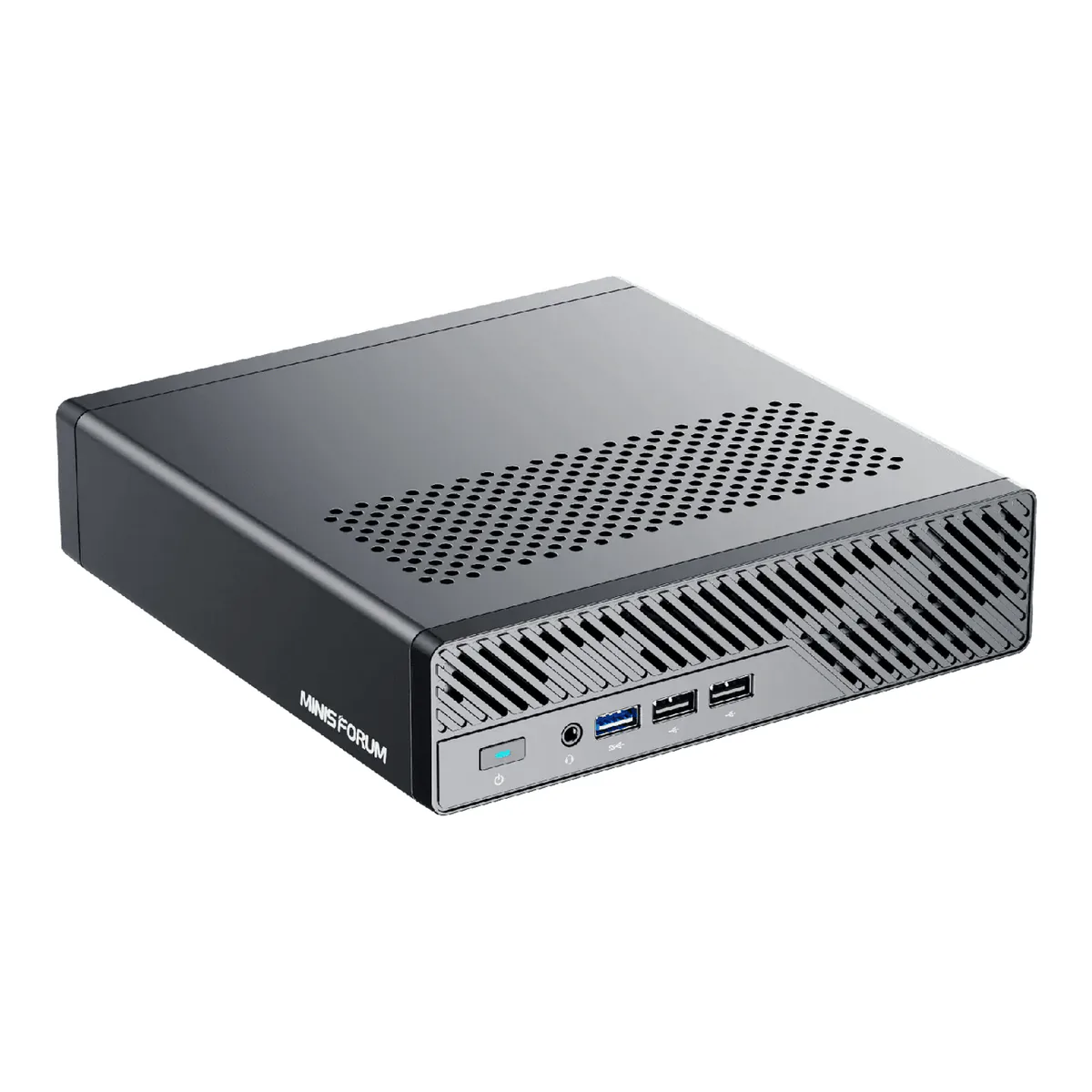
The MINISFORUM MS-01 buys you a rear panel no other mini PC has, two 10 gigabit SFP+ cages and a real PCIe slot, at the cost of a fan that owners running Plex say they can hear.
- Intel Core i9-13900H with vPro Enterprise support, 14 cores in 6 performance and 8 efficient, 20 threads, 24 MB L3 cache, up to 5.4 GHz
- Intel Iris Xe Graphics on dual-channel memory, Intel UHD Graphics on single channel
- DDR5-5200 dual channel across two SODIMM slots, up to a total maximum of 96 GB
- Three M.2 2280 NVMe slots, each up to 4 TB: one PCIe 4.0 x4, one PCIe 3.0 x4 and one PCIe 3.0 x2
- One PCIe 4.0 x16 slot, half-height and single-slot, running at up to PCIe 4.0 x8 speed, compatible with up to an RTX A2000 Mobile
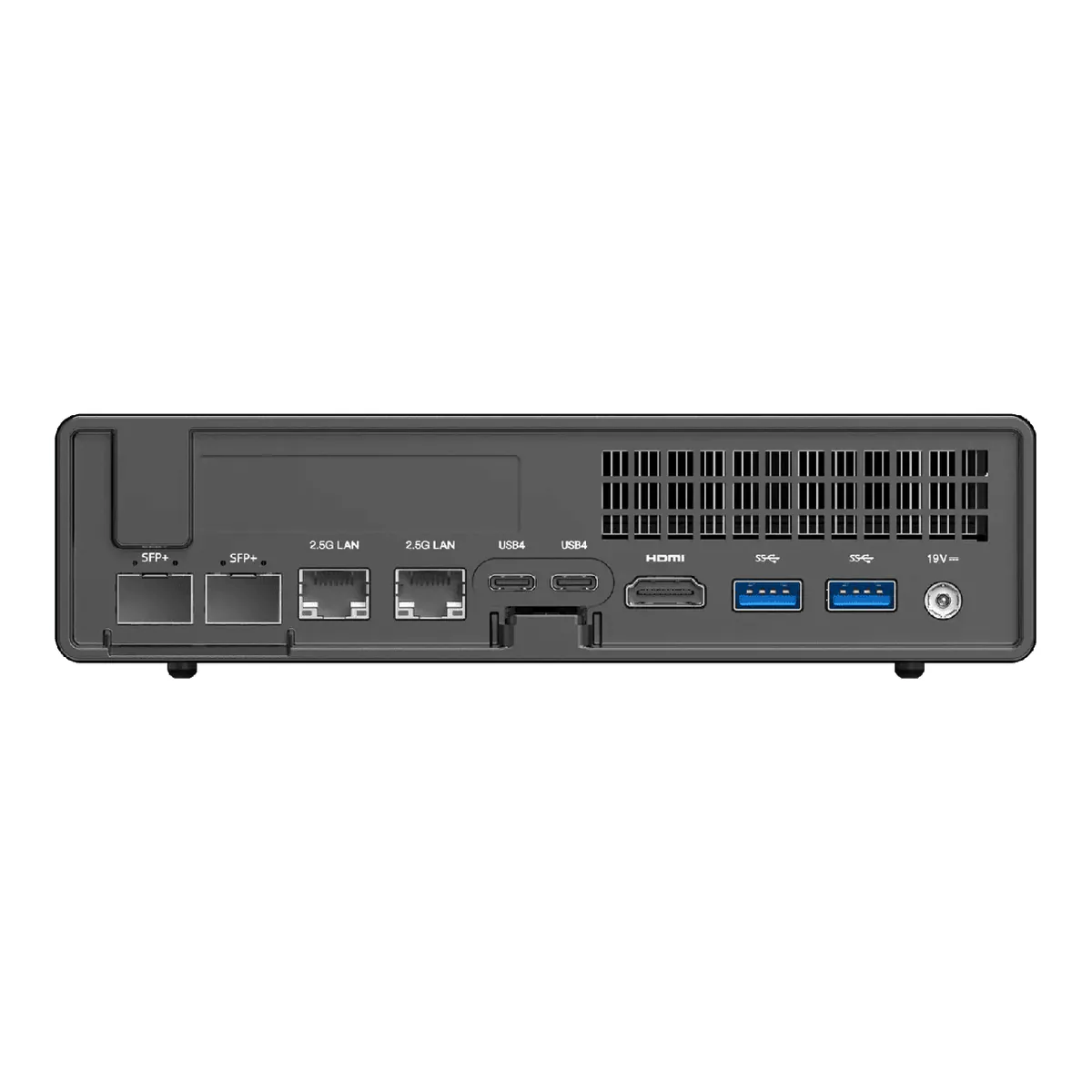
- Two 10 Gbps SFP+ LAN ports and two 2.5 Gbps RJ45 LAN ports
- Two USB4 ports at 40 Gbps, able to build a 20 Gbps network over Thunderbolt Bridge
- HDMI 2.0 at 4K 60 Hz plus two USB4 at 8K 30 Hz, for triple display
- Supports one U.2 NVMe SSD with two 22110 M.2 drives for up to 24 TB total
- Size 196 x 189 x 48 mm, Windows 11 Pro or Linux, Wi-Fi 6 and Bluetooth 5.2
We earn a commission on qualifying purchases through the links here, at no cost to you. It never decides what makes the list.
Sixty-five gigabits. MINISFORUM prints that number on the MINISFORUM MS-01, and it comes from arithmetic in place of a measurement: two 10 gigabit SFP+ ports, two 2.5 gigabit RJ45 and two USB4 links counted at 20 gigabits each, added together. No single link or path on the machine carries anything like it.
What is true underneath the addition is more interesting than the addition. No other mini PC on our mini PC shortlist puts two SFP+ cages and a PCIe slot on the same panel. This box exists for that panel.
The MINISFORUM MS-01 rear panel is the whole argument
Two 10 Gbps SFP+ LAN ports, two 2.5 Gbps RJ45, two USB4, HDMI 2.0 and the power input, in a chassis 196 by 189 by 48 mm. ServeTheHome, who were sent a unit, identified the silicon behind those ports: an Intel X710 driving the SFP+ pair and an Intel i226-LM on one of the 2.5 gigabit ports, with an i226-V on the other. Intel vPro management rides on the i226-LM, and vPro is how you administer this thing with no operating system running.
Buy the machine to sit in a rack and answer for itself, and the port you plug the management network into is not interchangeable with the one beside it.
Which GPUs fit the MS-01
One half-height, single-slot PCIe 4.0 x16 connector, wired at x8 speed. On any MINISFORUM MS-01 GPU question, half height settles it before the model number does. Nothing more to the expansion story, and still more than any other mini PC here offers. MINISFORUM states compatibility "up to RTX A2000 Mobile". Check that ceiling against whatever card you had in mind before anything else, because people tend to discover it after the box arrives. A network card or a storage controller is the easier fit.
Owners have found the edge of it. On one review video an owner reports "I am disappointed the 4000 doesn't fit", and that is a card, not a drive. Half-height and single-slot is a real constraint. Most people are here for the slot, so measure before you order.
Clearance bites inside the case separately. A ServeTheHome reader reports "there wasn't enough clearance for the second SSD" under the supplied heat bracket, a drive fitment problem with nothing to do with the slot.
Two USB4 ports sit beside it at 40 Gbps, and ServeTheHome notes they will carry Thunderbolt devices including 10 gigabit network adapters, which gives you a second expansion path if the slot is already spoken for.
Memory tops out at 96 GB
Two DDR5-5200 SODIMM slots, dual channel, 96 GB total. The memory is socketed, so you can raise it later, the opposite of how it works on most of the fast machines this competes with. On a box that will run virtual machines for years the ceiling matters more than the configuration you buy on day one.
One catch before you buy a single stick: the integrated graphics are Intel Iris Xe on dual-channel memory and drop to Intel UHD on a single channel. Populating one slot to leave room for an upgrade quietly downgrades the GPU.
Three M.2 slots, and they are not equal
One M.2 2280 at PCIe 4.0 x4, one at PCIe 3.0 x4 and one at PCIe 3.0 x2, each taking up to 4 TB. Only the first is a full speed Gen 4 slot, so a RAID array across all three runs at the pace of the slowest member.
There is a route past that. MINISFORUM supports one U.2 NVMe drive alongside two 22110 M.2 drives for up to 24 TB, and a U.2 conversion plate ships in the box.
MINISFORUM's own overview text says each M.2 slot takes a maximum of 2 TB and puts total capacity at 12 TB, while the specification table on the same page says 4 TB per slot. We follow the table, as the more precise statement. Plan a maximum build around the discrepancy, though, and trust neither number alone.
Is it quiet?
Two answers, and where they part is more useful than either alone.
ServeTheHome, testing the machine, says it "has a fast Core i9 processor and a reasonable noise profile" and frames the larger chassis as the trade that buys that. They are comparing it against one liter mini PCs, and against those it is a calmer machine.
Owners running it as a server put the emphasis elsewhere. Across roughly 408 comments on ten videos that name the MS-01 by model, two people describe the noise independently and both are specific about when: "If Jellyfin / Emby / Plex is doing a scan or something and the CPU gets up to 15-20%, you WILL hear that fan, and it's quite annoying", and separately "the inadequate cooling and the noise level which is quite annoying under full load". The same commenter lists inverted USB ports as a complaint. Neither of them calls it loud all the time, and the first is explicit that the machine is silent at rest and only sharp on boot. So the first complaint is about the fan curve, with the fan itself unblamed.
Both readings can hold. A Core i9-13900H in 1.78 liters is quiet at idle and audible once something asks it to work, and a media server asks it to work at unpredictable hours. If the box lives in the room where you sleep, let that settle the purchase.
Who should skip it
Anyone who needs a one liter machine. ServeTheHome is direct that the chassis is larger than the Project TinyMiniMicro class and says that if it has to fit the same space as a one liter PC, it will be slightly too big. The size buys the slot and the four network ports. That trade is the product.
Skip it too if you want a machine that arrives ready. ServeTheHome's unit shipped with Windows 11 Home in place of Pro, so remote desktop is not included and management runs through vPro instead. Their practical tip for a headless install is to fit a dummy HDMI plug, because vPro prefers a display attached. Treat that as one shipment and not the rule, since MINISFORUM's own specification table lists Windows 11 Pro or Linux and a later buyer reports receiving Pro.
And skip it if it has to live where you sleep. See the noise section above: the independent test and the owner reports agree that it is quiet at idle and disagree only about how much the fan curve matters when something loads it.
What it fits with
Before ordering, run three compatibility checks. The PCIe card has to be half-height and single-slot and no larger than MINISFORUM's stated RTX A2000 Mobile ceiling. The SFP+ cages need transceivers or direct-attach cables, and RJ45 patch leads will not do. Those are a separate purchase people forget. And if you want the full Iris Xe graphics, both memory slots have to be populated.
Get those three right and the rear panel does something no other machine in the mini PC and small form factor category can.
A closer look at the MINISFORUM MS-01
Made up your mind?